

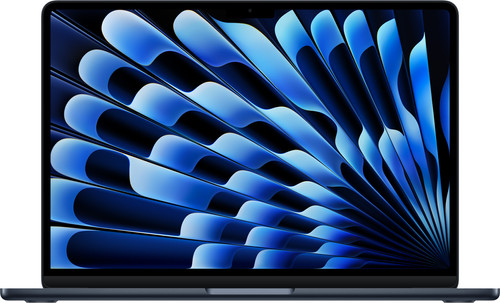
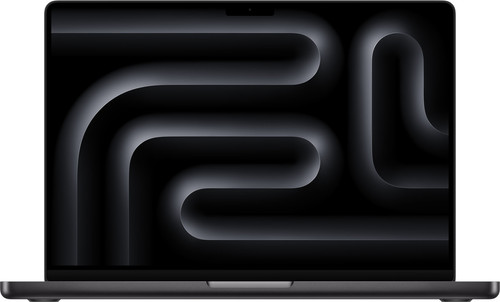
The short answer
For most people the MacBook Air M5 is the smartest buy. In short tasks it is almost as fast, it is lighter and a good deal cheaper. The MacBook Pro M6 only earns its extra cost if you put the computer under heavy load for long stretches, need a better screen or connect a lot of accessories.
Choose the MacBook Air if…
- you mainly browse, email, study, use Office or Google Docs and occasionally edit photos or short videos;
- you want a light laptop that you take everywhere;
- you want a silent laptop: there is no fan in it;
- your budget is around €1,400 to €1,800;
- you would like a bigger screen without the Pro price: the 15-inch Air.
Choose the MacBook Pro if…
- you regularly run long video exports, 3D, code compilation or heavy photo batches;
- you want a screen with 120Hz, deeper blacks and more brightness for HDR;
- you find HDMI, an SD card reader and three Thunderbolt ports useful;
- you want the maximum battery life;
- you want to use the laptop for five years or more for heavier work.

In doubt? Then you probably don't need the Pro. Get the Air with 16 GB of memory and go for more storage rather than the Pro chip. Are you sure you do heavy work, such as video, 3D or development? Then the MacBook Pro M6 is the sensible step, and not a luxury.
Specs side by side
| MacBook Air | MacBook Pro | |
|---|---|---|
| Chip | Apple M5: 10-core CPU, 8- or 10-core GPU (15-inch: always 10-core) | Apple M6 (2 nm): 12-core CPU, 12-core GPU |
| Memory | 16 GB as standard, up to 32 GB | 16 GB as standard, up to 32 GB |
| Storage | 512 GB as standard, up to 4 TB | 1 TB as standard, up to 4 TB |
| Screen | 13.6- or 15.3-inch Liquid Retina (LCD), 60Hz | 14.2-inch Liquid Retina XDR (mini-LED), ProMotion up to 120Hz, 1,000 nits (1,600 nits HDR) |
| Cooling | No fan: completely silent | Fan: holds top speed for longer |
| Battery (according to Apple) | Up to 18 hours | Up to 24 hours of video, 16 hours of wireless web |
| Ports | 2× Thunderbolt 4, MagSafe, headphone jack | 3× Thunderbolt 4, HDMI, SDXC card reader, MagSafe, headphone jack |
| Wireless | Wi-Fi 7, Bluetooth 6 | Wi-Fi 7, Bluetooth 6 |
| Weight | approx. 1.24 kg (13-inch) / approx. 1.51 kg (15-inch) | 1.55 kg |
| Recommended retail price | from €1,429 (13-inch) / €1,729 (15-inch) | from €2,329 |
Highlighted in green = better on that point. Recommended retail prices in the Netherlands, November 2026. Online shops are often below them.
Benchmarks
Benchmarks don't tell you everything, but they do show clearly how big the difference really is. We use Geekbench 6. That test is used most often to compare Macs, so the figures are easy to put side by side. Higher is better.
Source: Tom's Hardware (MacBook Pro M6-review), iPhone in Canada / TechRadar (MacBook Air M5)
Source: Tom's Hardware (MacBook Pro M6-review), MacRumors (Geekbench-overzicht Macs)
Performance: how big is the difference really?
In Geekbench 6 the MacBook Pro M6 is about 13% faster on one core and around 24% faster when all cores join in. You notice that mainly in work that takes minutes, not in things that are done in a few seconds.
More important than the chip is the cooling. The Air has no fan. For short tasks that makes no difference, but during a long video export or a demanding game it has to throttle back after a while to stay cool. The Pro cools with a fan and holds its top speed for much longer. In practice that is often a bigger difference than the benchmark score shows.
In addition, the M6 has a 12-core GPU instead of 8 or 10 cores. According to Apple, graphics performance is up to 30% higher than on the M5. Tom's Hardware saw a 4K-to-1080p video conversion in HandBrake finish in 2:50 minutes on the M6, versus 3:31 on the MacBook Pro M5.
Coming from an older MacBook?
If you have a MacBook Air M1 or M2, even the MacBook Air M5 is already 1.8 to 2 times as fast in multi-core. You really notice that upgrade, even without the Pro.
Screen: the biggest visible difference
This is where the Pro stands out most. The mini-LED screen (Liquid Retina XDR) has much deeper blacks, higher brightness for HDR video and ProMotion up to 120Hz. Scrolling and animations look noticeably smoother as a result than on the Air's 60Hz screens.
The Air's screen is sharp and colourful and perfectly fine for daily use. A photographer or video maker working in HDR? Then the Pro's XDR screen is a real reason to pay the extra.
Battery and portability
Apple promises up to 24 hours of video viewing for the MacBook Pro M6, the longest battery life of any Mac, and up to 18 hours for the Air. Tom's Hardware got over 19 hours out of the MacBook Pro M6 in a mixed test at 150 nits. Both will comfortably get you through the working day.
At about 1.24 kg, the 13-inch Air is clearly lighter than the Pro at 1.55 kg. If you carry your laptop in a bag every day, you notice that difference.
And the MacBook Pro with PROLED touchscreen?
Since November 2026 there has also been a more expensive MacBook Pro with an OLED touchscreen (PROLED XDR) in 14 and 16 inch, with an M5 Pro or M5 Max chip. In the US it starts at $2,899, so well above the M6 Pro. It is aimed at professionals who need the very best screen, up to 128 GB of memory or the extra processing power of a Pro or Max chip. If you are torn between an Air and a Pro, that model is probably overkill. Benny will compare it separately soon.
Prices
These are the configurations Benny recommends, with a direct link to the product page at Dutch online shops. You order straight away there. Prices are updated automatically as soon as the shop changes them in its product feed. Note: the 13-inch Air with 1 TB (around €1,750) comes close to a Pro, but is still around €600 cheaper. Always check the current price at the shop.
If you buy through these links we may earn a commission, at no extra cost to you. That does not change the verdict. How we make money.
 FAQ
Is the MacBook Air M5 good enough for students?
Yes. For lectures, reports, research, entry-level programming and some photo and video editing, the MacBook Air M5 is more than fast enough. It is light, silent and lasts all day on one charge.
Does the MacBook Air have a fan?
No. The MacBook Air is passively cooled and is therefore completely silent. During long, heavy tasks it does throttle back to stay cool. The MacBook Pro has a fan and holds its top speed for longer.
Is 16 GB of memory enough?
For most people, yes. If you work with large video projects, lots of virtual machines or local AI models, choose 24 or 32 GB. You cannot upgrade the memory after purchase.
What is the difference between the MacBook Pro M6 and the MacBook Pro with PROLED?
The MacBook Pro M6 is the 14-inch entry model with a mini-LED screen. The MacBook Pro with PROLED XDR has an OLED touchscreen, a thinner design and an M5 Pro or M5 Max chip, and is considerably more expensive.
Which MacBook has the best battery?
According to Apple, the MacBook Pro M6: up to 24 hours of video viewing, compared with up to 18 hours for the MacBook Air M5. In practice both last a full working day.
Should I get the 13- or the 15-inch MacBook Air?
The 13-inch is lighter and cheaper and ideal for carrying around. The 15-inch gives more screen space and the 10-core GPU as standard. If you often work with two windows side by side and without an external screen, the 15-inch is worth considering.
Sources
Benny does not test in a lab himself. Specs come from the manufacturer, measurements from independent testers. These are the sources for this comparison:
- Tom's Hardware: Apple MacBook Pro 14-inch (M6) review
- Tom's Guide: MacBook Pro M6 review
- MacRumors: Geekbench-scores van Macs (maart 2026)
- MacRumors: MacBook Air M5 vs M4 in Geekbench
- MacRumors: M6 14-inch MacBook Pro aangekondigd
- MacRumors: OLED MacBook Pro met touchscreen
- iCulture: prijzen MacBook Pro M6 in Nederland
- iCulture: MacBook kopen (overzicht adviesprijzen)
- iCulture: alles over de MacBook Air M5
- TechCrunch: Apple unveils new MacBook Air and MacBook Pro with M5
Spotted something out of date? Let us know and we'll fix it.