

The short answer
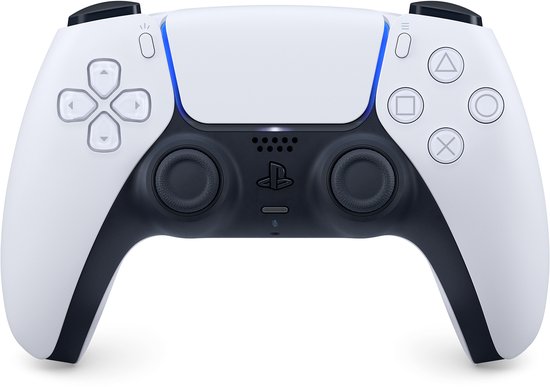
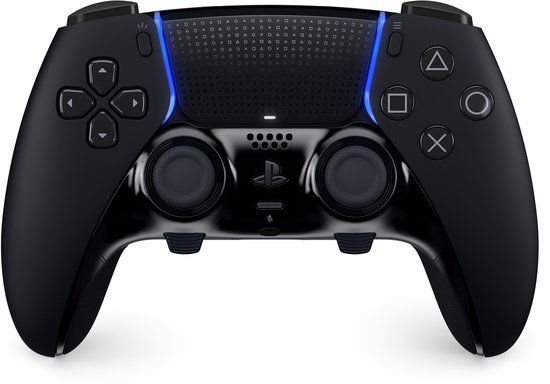
In the hand and in games they feel the same: both have Sony's haptic feedback and adaptive triggers. The DualSense Edge adds back buttons, trigger stops, profiles and replaceable sticks, and is more solidly finished. On the other hand, it has a smaller battery and costs €152 more at bol. For most players the standard DualSense is the sensible buy. Tom's Guide and TechRadar both think the Edge is a very good controller, but too expensive for what it adds.
Choose the DualSense if…
- you mainly play story-driven games, sports games or the occasional match;
- you are looking for a second controller for the sofa;
- you want to play wirelessly for as long as possible on one charge;
- you don't want to spend an extra €150 on buttons you might not use.
Choose the DualSense Edge if…
- you play a lot of shooters or other competitive games and want back buttons, so your thumbs stay on the sticks;
- you want to save your own button layout and stick sensitivity per game;
- you want to replace a stick that starts to drift yourself instead of buying a new controller;
- you usually play with a cable or don't mind charging more often.

Ask yourself one thing: do you miss back buttons right now? If so, the Edge is the nicest way to get them on a PS5, and the swappable stick modules make it less of a throwaway item in the long run. If not, you are paying €152 extra for a controller that does exactly the same in ordinary games and runs flat sooner. In that case buy the standard DualSense, with a charging station alongside it if you like.
Specs side by side
| DualSense | DualSense Edge | |
|---|---|---|
| Haptic feedback and adaptive triggers | Yes | Yes |
| Back buttons | No | 2, supplied in two shapes (half-dome and lever) |
| Trigger stops | No | Yes, three positions per trigger |
| Custom profiles | No | Yes, switch with Fn buttons while playing |
| Swappable stick modules | No | Yes, without a screwdriver |
| Stick caps | Fixed | Standard, high and low (2 of each supplied) |
| Battery capacity (teardown) | 1,560 mAh | 1,050 mAh |
| Playtime in practice (Tom's Guide) | about 6 to 7 hours | sometimes flat after just 5 hours |
| Weight | about 15% lighter than the Edge | about 330 grams |
| USB cable in the box | No (controller sold separately, according to Sony) | Yes, braided cable with lock |
| Carrying case | No | Yes, can be charged in the case |
| Price | €59.99 at bol | €212 at bol |
Highlighted in green = better on that point. Features and box contents according to Sony (manufacturer's figures). Battery capacity from a teardown reported by TechRadar; Sony itself does not quote a capacity or battery life. Playtime and weight according to Tom's Guide. Prices as of 17 November 2026.
Benchmarks
Sony does not state a battery life for either controller. The only thing the company said about it is that the Edge lasts 'slightly less long' than the standard controller. We found no lab measurements of playtime. That is why only the battery capacity from a teardown is shown here. What testers saw in practice is under Battery.
Source: TechRadar: waarom de accu van de DualSense Edge zo kort meegaat
What the Edge adds
The basis is the same: the same shape, the same haptic feedback and the same adaptive triggers. The Edge adds four things.
- Back buttons. Two of them, which you can assign any function. There are two shapes in the box: half-domes and levers. Tom's Guide calls them the biggest plus. For comparison: the Xbox Elite Series 2 has four.
- Trigger stops. With a slider per trigger you choose from three positions. A short travel is handy in shooters. TechRadar did notice little difference between the two shortest positions.
- Profiles. Per game you set a button layout, stick sensitivity, dead zones and vibration strength. With the Fn buttons under the sticks you switch while playing.
- Swappable sticks. You get three types of stick caps, and you can replace the whole stick module without tools.
You also get a carrying case and a braided USB cable with a lock, so the cable doesn't pop out while you are playing.
Battery: the Edge's weak point
The Edge has a 1,050 mAh battery, the standard DualSense a 1,560 mAh one. That emerged from a teardown; Sony itself only said that the Edge lasts 'slightly less long'.
How many hours that amounts to differs per tester and per game. Tom's Guide saw the Edge sometimes flat after just 5 hours, versus 6 to 7 hours for the standard controller. TechRadar got about 7 hours out of the Edge and found the difference from the standard DualSense small in its own test. One thing is certain: neither is a marathon runner, and the Edge needs the charger first.
If you play long sessions, a cable or a charging station is no luxury with the Edge. It fits on the standard DualSense's charging station, which you buy separately.
Replacing sticks: handy for stick drift
With heavy use a stick can start to drift: your character then moves while you are not touching anything. On the standard DualSense you cannot replace the stick yourself. On the Edge you click the module out and put a new one in. That can be done without a screwdriver.
A separate stick module was listed at €39.99 at bol on 17 November. That is a lot of money for a part, but less than a new controller. See it as insurance: nice if you play hundreds of hours a year, unnecessary if your controller mostly lies on the sofa.
Is the Edge worth the extra money?
On 17 November the DualSense cost €59.99 and the DualSense Edge €212 at bol. For the €152 difference you can buy two extra standard controllers.
The testers largely agree. Tom's Guide thinks the Edge is fantastic and highly customisable, but too expensive and with too short a battery life. TechRadar calls it a great controller that ultimately does not justify its price, and recommends it mainly if you want back buttons, shorter triggers and a layout per game. If you recognise yourself in that, the money is well spent. Otherwise not.
Prices
Below are direct links to the product pages at Dutch online shops. Both controllers come in several colours; the price can vary by colour. Prices are updated automatically as soon as the shop changes them in its product feed. Always check the current price at the shop.
If you buy through these links we may earn a commission, at no extra cost to you. That does not change the verdict. How we make money.
 FAQ
What is the difference between the DualSense and the DualSense Edge?
The Edge has two back buttons, three-position trigger stops, custom profiles with Fn buttons and swappable stick modules and stick caps. It comes with a carrying case and cable. The standard DualSense has a bigger battery and is much cheaper.
How long does the DualSense Edge's battery last?
Sony does not quote a number of hours. Tom's Guide saw it sometimes flat after just 5 hours, TechRadar got about 7 hours. The battery is 1,050 mAh, versus 1,560 mAh in the standard DualSense.
Does the DualSense Edge have better vibration or triggers?
No. The haptic feedback and the adaptive triggers are the same as on the standard DualSense. The difference is in the extra buttons, the settings and the replaceable parts.
Do these controllers also work on a PC?
Yes, both work via USB or Bluetooth. According to Sony, haptic feedback and adaptive triggers on PC may require a USB connection and only work in games that support them. You edit the Edge's profiles on PC with the PlayStation Accessories app for Windows.
Is a charging cable included?
With the Edge, yes: a braided USB cable with a lock. For the DualSense sold separately, Sony states that no cable is included.
Sources
Benny does not test in a lab himself. Specs come from the manufacturer, measurements from independent testers. These are the sources for this comparison:
- PlayStation: DualSense Edge wireless controller
- PlayStation Nederland: DualSense draadloze controller
- Tom's Guide: Sony DualSense Edge review
- TechRadar: DualSense Edge review
- TechRadar: DualSense vs DualSense Edge
- TechRadar: waarom de accu van de DualSense Edge zo kort meegaat
Spotted something out of date? Let us know and we'll fix it.